从C脱坑开始接触Python,这门传说中的语言
逐渐展示出了它的强大( ॑꒳ ॑)
最近在网上发现有使用python进行12306查票的教程,正好拿来练练手,于是乎写下此文
重写了查询方式
由于12306反爬措施频繁更新,无法查询
今后将不定期更新
流程
- 获得提交网址
- 提交信息
- 解析并打印获得信息
需要的模块
- requests 用于获取网页数据
- docopt 解析命令行参数
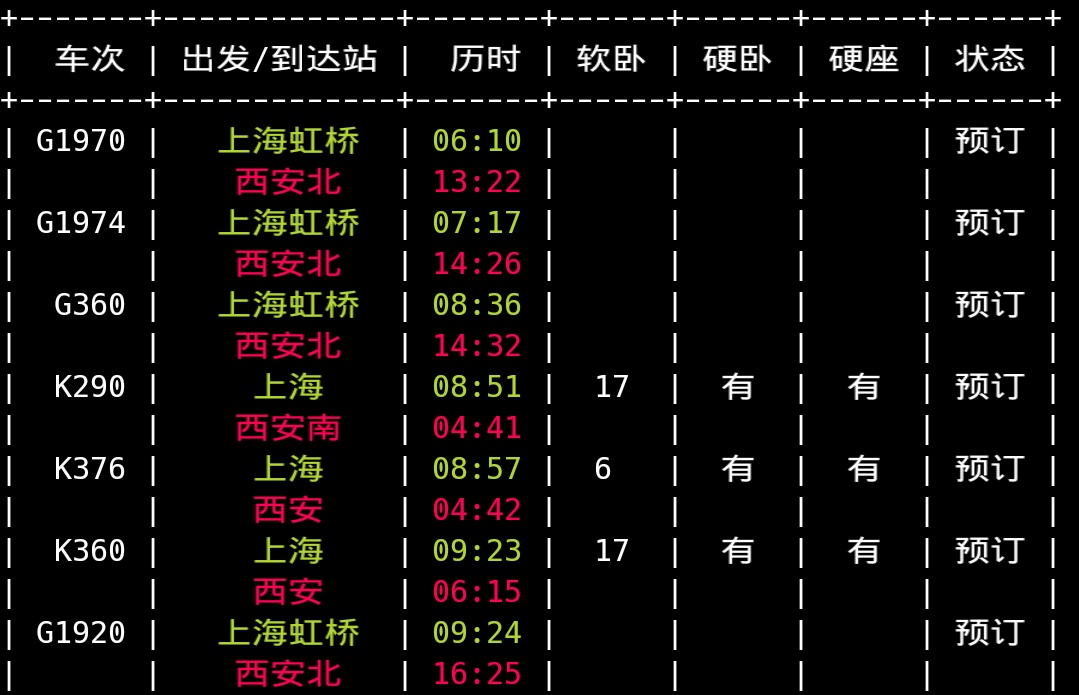
- prettytable 数据用表格的形式打印在终端
- colorama 为打印在表格中的数据着色
- pprint 格式化输出
安装方式:pip install requests prettytable docopt colorama pprint
第一步-获取提交入口
当我们打开网站时,发现只能从页面中的表单进行输入,(另一种方法这里不做讨论)
那么,怎么将数据直接提交给12306的服务器呢?
没错,通过修改网址中的数据来提交,但当然在浏览器中是看不到网址的。
打开谷歌浏览器,在12306查票页面中敲入F12调出开发者工具,找到“Network”按F5刷新(在页面中随便填入查询信息不然无法截获http请求),不出意外就会有资源的请求url、HTTP方法、响应状态码、请求头和响应头及它们各自的值、请求参数等等。
在列表里找到网址:
{}中需要填入相应数据
比如 {2018-09-19}{SHH}{XAY} 日期只能填写当日及之后30天
那几个字母就是站点的代号,所谓的电报码
显然,12306不愿让我们知道对应的代号,但在通过chrome中强大的f12,同样可以找到对应代号的链接
https://kyfw.12306.cn/otn/resources/js/framework/station_name.js?station_version=1.8971

不难发现在station_names字符串中有站点对应的中文,因此可以通过程序来获得代号并填入之前的链接
1 | import re |
运行程序,输出了站点拼音对应的代号
但如果要获取其中的代号还需要将对应信息放在文件中读取
因此在命令行重定向输出:bash $python get_stations_code.py > stations.py
这里导入成python文件是为了之后的查询工作,可以直接import进来。
第二步-输入处理
完整程序1
2
3
4
5
6
7
8
9
10
11
12
13
14
15
16
17
18
19
20
21
22
23
24
25
26
27
28
29
30
31
32
33
34
35
36
37
38
39
40
41
42
43
44
45
46
47
48
49
50
51
52
53
54
55
56
57
58
59
60
61
62
63
64
65
66
67
68
69
70
71
72
73
74
75
76
77
78
79
80
81
82
83
84
85
86
87
88
89
90
91
92import requests
import json
import time
import re
from prettytable import PrettyTable
from colorama import Fore,init
title = '车次 出发/到达站 历时 软卧 硬卧 硬座 状态'
nowTime = time.strftime('%Y-%m-%d')
url1 = 'https://kyfw.12306.cn/otn/resources/js/framework/station_name.js?station_version=1.8971'
response = requests.get(url1)
stations = re.findall(u'([\u4e00-\u9fa5]+)\|([A-Z]+)',response.text)
stationsPY = re.findall(u'([A-Z]+)\|([a-z]+)',response.text)
stations = dict(stations)
stationsPY = dict({v:k for k,v in stationsPY})
#print(stations)
def name(code):
for k,v in stations.items():
if code == v:
return k
Fs = input('From station:\t')
Ts = input('End station:\t')
F = stations.get(Fs) or stationsPY.get(Fs) or 'SHH'
T = stations.get(Ts) or stationsPY.get(Ts) or 'XAY'
date = input('time of train:\t') or nowTime
if len(date) == 8:
date = '{}-{}-{}'.format(date[:4],date[4:6],date[6:])
elif len(date) == 4:
date = '{}-{}-{}'.format(time.strftime('%Y'),date[:2],date[2:])
elif len(date) == 2:
date = '{}-{}'.format(time.strftime('%Y-%m'),date)
elif len(date) == 1:
date = '{}-{}'.format(time.strftime('%Y-%m'),'0'+date)
print(date,F,T)
#url='https://kyfw.12306.cn/otn/leftTicket/query?leftTicket
url = 'https://kyfw.12306.cn/otn/leftTicket/queryA'
header = {'User-Agent': header = {'User-Agent': 'Mozilla/5.0 (Windows NT 6.1; WOW64; rv:23.0) Gecko/20100101 Firefox/23.0'}
key_word = {
"leftTicketDTO.train_date": date,
"leftTicketDTO.from_station": F,
"leftTicketDTO.to_station": T,
"purpose_codes": "ADULT"
}
try:
response = requests.session().get(url, params=key_word, headers=header)
tickets = response.json()
lists = tickets['data']['result']
except Exception as error:
print('404 ?_? this url is losted')
exit(0)
table=PrettyTable(title.split(' '))
#tickets=[]
for list in lists:
#print(list+'\n\n')
ticket = []
lis = list.split('|')
train_code = lis[3]
from_station_name=lis[6]
to_station_name = lis[7]
start_time= lis[8]
arrive_time =lis[9]
lishi = lis[10]
swz_num = lis[32] or lis[25]
zy_num = lis[31]
ze_num = lis[30]
gr_num =lis[21]
rw_num = lis[23]
dw_num = lis[27]
yw_num = lis[28]
rz_num = lis[24]
yz_num = lis[29]
wz_num = lis[26]
qt_num = lis[22]
note_num = lis[1]
#ticket.append()
if lis[11] == 'Y':
lis11 = '有'
elif lis[11] == 'N':
lis11 = '无'
elif lis[11] == 'IS_TIME_NOT_BUY':
lis11 = 'X'
fs = (Fore.GREEN + name(lis[6]) + Fore.RESET)
ts = (Fore.RED + name(lis[7]) + Fore.RESET)
tfs= Fore.GREEN + lis[8] + Fore.RESET
tts= Fore.RED + lis[9] + Fore.RESET
table.add_row([lis[3],fs+'\n'+ts,tfs+'\n'+tts,lis[23],lis[28],lis[29],lis[1]])
print(table)